Ryoko: Suggestion to change link in Tutorial Page

Sud

"[If life=Dota] I'd have quit long ago" -- Acehart
Reaction score
64
As my map grows, I have found it necessary to convert the item icons from their .TGA roots to .BLP to save filesize (I've been able to save the greater part of a meg in doing this).

On the tutorial site (http://www.world-editor-tutorials.thehelper.net/skinning.php), you recommend using the "Warcraft III Image Extractor II" file. I found this utility to be flawed in the task I set it to - namely, it does not add the "Alpha Channel" to the TGA files being converted. This results in black, blank boxes in the game for all the converted icons, and some wasted time. I even got an .OCX error which I had to manually fix upon my first use of that program.

Doing some searches back to forum topics on the subject of .TGA to .BLP conversions, I've noted some unresolved issues from this and would like to make a suggestion that you change the recommended software from the Extractor II to The Prophet's WarcraftIIIViewer software ( available at http://www.wc3sear.ch/index.php?p=Tools&ID=11&sid= ) which actually does prompt you to add the alpha channel and has some nice features, such as the insanely useful batch conversion utility so you can convert those 100 icons all at once instead of one by one.

Just may save some people some time and headaches.
 
Due to heavy icon issues, I have done some homework. And not all of this is true.

I want to convert all my icons to BLP
When using BLP format, you must select the alpha channels in ulead by selecting the entire image, then saving it. Here I have created two icons - a normal button, and a disabled button. The dashed line around my image shows that I am saving it with the entire image selected.

-Save in TGA format
-64x64 pixels in size
-NO compression
-ALL selected

(see icons1.jpg)

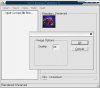
Then I converted it to BLP with the WC3 Image extractor II, as shown. I recieve a prompt that gives me an option to set quality. I stick to about 80 percent.

(see icons2.jpg)

Now I import them into my map. I import them EXACTLY AS THE TUTORIAL SAYS, and nothing else.

I didn't mess up the path, get the green box, then come post on the forum. I follow the tutorial.

I did not forget to select the image, come here, and post because I got a black box.

NOTE: Names in the image shown are for the BLP test icons. If your using TGA files, the extensions will be TGA in the import manager.

(see icons3.jpg)

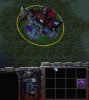
I assigned my icons to a unit in the game. When I test my map, it works perfectly.

(see icons4.jpg)

Don't bother, I want to use TGA in my map.
This is PERFECTLY acceptable. But save them DIFFERENT. When saving icons for TGA format use, DO NOT select the image in ULEAD. No selection areas, no alphas, no dashed line.

Here I have attached a demo map that uses TGA files. You can see I did not select the image, come to the forum, and post because it crashes my game.

-64x64 pixels in size
-NO compression
-NO Selection area

And it works perfectly fine.

I beleive using BLP will save me uber space
I don't know how many times I've said this, but N.T.

I have attached an image for you all to see. I imported BOTH the BLP file, and the TGA file.

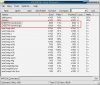
When WC3 saves a map, it compresses ALL files, including TGA. Lets open it with WINMPQ, and look at what the compressed sizes of both are.

I have highlighted them in red. Notice, they are only 1k different. To save a meg in a map, you would need 1000 icons.

(see icons5.jpg)

The tutorial does not mention selection areas, or other viewers
Sud does have valid points, that it is hard to understand how to convert your files. And I have experienced problems with WC3 Image extractor before.

If 'Darg' would like to revamp his tutorial, I'd certainly update the website.

But all the information you need, has been layed out now. I do apreciate Sud trying to help stamp out the noob questions, caused by the people who won't listen to my 1000 other posts about icons.

Last Thoughs
If using another viewer allows us to save the TGA the same way, every time, for both BLP and TGA, lets do that. But I don't know enough about the other viewer, that evidence was not submitted.
.... I done talking now :)
 

Attachments

  • icons1.jpg
    icons1.jpg
    10.6 KB · Views: 202
  • icons2.jpg
    icons2.jpg
    30.3 KB · Views: 223
  • icons3.jpg
    icons3.jpg
    46.4 KB · Views: 207
  • icons4.jpg
    icons4.jpg
    46.8 KB · Views: 243
  • icons5.jpg
    icons5.jpg
    87.3 KB · Views: 238
Some replies:

"I want to convert all my icons to BLP"

The description for that one is different in that I received the black box (I believe the green one would be a different issue entirely). The black box I can say with confidence has to be the alpha issue.

"Don't bother, I want to use TGA in my map."

The TGAs in question were created with Irfanview, a lot of them coming from screenscrapes captured off the clipboard. Perhaps with the tool you mentioned it does have the alpha, though Irfan is seriously popular image acquisition software.

"I beleive using BLP will save me uber space"

This is situational, but in my map I had over 120 custom icons. When I compressed these to BLP, I saved roughly 700kb, almost a meg. This is a significant gain especially considering that the maximum playable battle.net map is 4mb.

"The tutorial does not mention selection areas, or other viewers"

I believe the absence of a feature to actually add the alpha channel kind of makes that software unsuitable, in the very least, for a newbie tutorial. It's like the equivalent of a graphics viewer that wouldn't let you resize your icons to 64x64 - it just won't work (and it won't work in the most annoying, game crashingest, hair tearingest out way). The latter software I suggested because it does say right out "this image needs an alpha channel to work, click yes to add an alpha channel" when you do the conversion. Plus it has better features such as the batch conversion I mentioned.
 
Sud said:
The description for that one is different in that I received the black box (I believe the green one would be a different issue entirely). The black box I can say with confidence has to be the alpha issue.
What? We already agree on that. Read carefully :
SD_Ryoko said:
I did not forget to select the image, come here, and post because I got a black box.
Selecting the image in ulead CREATES the alpha channels. So we already both agree.....Ulead gives you the option. You don't need to be confident; its a known fact.

Green Box: Icon not found. Path is wrong.
Black Box: Bad alpha channels / layers.
Crash: Bad save format, bad selection area.

Sud said:
The TGAs in question were created with Irfanview, a lot of them coming from screenscrapes captured off the clipboard. Perhaps with the tool you mentioned it does have the alpha, though Irfan is seriously popular image acquisition software.
I can understand that. But all of the tutorials reccomend ULEAD at this point. Mainly because, its much much more powerfull, easier to get than Photoshop, gives you the alpha channel options, has a free trial, and both Darg and I have the full ver.
Sud said:
This is situational, but in my map I had over 120 custom icons. When I compressed these to BLP, I saved roughly 700kb, almost a meg. This is a significant gain especially considering that the maximum playable battle.net map is 4mb.
The only way this is even conceivably possible, is that your program for TGA is not saving it as optomized as the program we reccomend. When saved, all TGA icons should be 13k in size, and compress to 6k. As shown in my screen shot, they are almost the exact same size. My guess would be, your TGA program saves them at 20k+ each.

NOTE: All BLP is, is a compressed version of TGA. And, World Edit compresses your TGA's for you already. Provided, they are correct size and format.
Sud said:
I believe the absence of a feature to actually add the alpha channel kind of makes that software unsuitable, in the very least, for a newbie tutorial. It's like the equivalent of a graphics viewer .....
I agree. Unsuitable for a newbie tutorial. But 'unsuitable' for the more advanced of us, who know how to do alpha channels, who design models for alpha channels, and handle models right down to the alpha layers.

Give Darg a chance to review it, and we'll see what he says. After all, its his tutorial. Please also, post a much shorter summary of the programs, steps, and process, for his review.
 
Another note.

Have a look at the skinning tutorial. This is an example of why 'Ulead'.

See how selecting and unselecting the patches controls the alpha channels? And that in turn, controls layers and team colors.

My question is, can the other programs do that too? When you tell it to 'create' alpha channels, will it preserve the original? And handle the team color areas?

Lastly, if your real curious about how alphas and layers work, check out 'Adding Materials'. Even if you don't model, it will give you great understanding of how it all works.

Thanks for your participation, Sud :D
 
Selecting the image in ulead CREATES the alpha channels. So we already both agree.....Ulead gives you the option. You don't need to be confident; its a known fact.

Ok that works - the only thing is that it may need to be clearer that it is mandatory to use ULead otherwise your icons aren't going to work.

The only way this is even conceivably possible, is that your program for TGA is not saving it as optomized as the program we reccomend. When saved, all TGA icons should be 13k in size, and compress to 6k. As shown in my screen shot, they are almost the exact same size. My guess would be, your TGA program saves them at 20k+ each.

All of the TGA icons were 13k in size. They compressed to about 5-7kb. The file size of my map in the previous version was 4.5mb which reduced to 3.7mb using Vexorian's map optimizer. The file size of my map in the version where I introduced .BLP icons was 3.8mb reduced to 3.1mb via Vexorian. All the .TGAs are of the correct size and format, and if the WorldEditor is further compressing them, it's doing a bad job of it because the benefit I received was immediate. Of course I will agree with you that this won't be an issue for the average person who's just throwing in one or two icons, but in my case I had a critical mass of the things and needed to reduce the size of them.

Give Darg a chance to review it, and we'll see what he says. After all, its his tutorial. Please also, post a much shorter summary of the programs, steps, and process, for his review.

Sure I can do that. I'm not at home at the moment (working) but when I get back later tonight I'll do you one better and do a short walkthrough of it with screenshots.
 
Sud said:
The latter software I suggested because it does say right out "this image needs an alpha channel to work, click yes to add an alpha channel" when you do the conversion. Plus it has better features such as the batch conversion I mentioned.

What about FullScreen.blp, from the Loading Screen tutorial? Its model file only uses 1 layer, therefore, no alpha channels. If you add them, it doesn't work.
 
I use a mac...so maybe do it for me..?...but it the picture shows up fine when Im about to learn it...i see it clear..its just that it disappears when i already learned it..and it doesn't show up in the ability bar..

So could ne1 tell me If i placed them wrong
 
Sounds to me then that you specified a research/learn icon, but not a skill icon. It should be in the same area as the research icon for the spell.

If that isn't it I'll have to look at it, but not home atm
 
I did specify it...its in the normal icon space..

and also..my bad..I folowed the link from the original thread and accidently posted here..
 
General chit-chat
Help Users
  • No one is chatting at the moment.
  • V-SNES V-SNES:
    Happy Friday!
    +1
  • The Helper The Helper:
    we were down for a minute - think a log file or something got too big
    +1
  • Ghan Ghan:
    The alerts say it was down for a while unfortunately.
  • Ghan Ghan:
    Didn't know what was going on while I was at work.
  • Ghan Ghan:
    Disk filled up with logs. Fixed now.
    +1
  • The Helper The Helper:
    not a problem at all thanks for getting us back up
  • The Helper The Helper:
    I think the bots are finding a way to get through the anubis
  • The Helper The Helper:
    Happy Wednesday Everyone! Hope everyone has a Fantastic Day!
    +1
  • The Helper The Helper:
    Yeah, stats are showing big bot influx like 12k page views.
  • Wizard Wizard:
    :wave:
    +1
  • Ghan Ghan:
    TH changed his avatar again. 6 more weeks of summer.
    +3
  • Wizard Wizard:
    lol
    +1
  • The Helper The Helper:
    Guys just a heads up I am going to be shutting the site down soon. I am just waiting on the NUON people to decide whether they want to transfer forum data and keep the discord. My email is [email protected] for anyone that wants to keep in touch and I have a facebook too. I will make an official post later. Love you guys and will miss everyone!
    +1
  • V-SNES V-SNES:
    Sent a pm @The Helper
  • Stephen Stephen:
    Oh no - please don't lose the Nuon content
    +1
  • The Helper The Helper:
    Someone email AtariAge and see if they want me to transfer the forum data over to it
  • Ghan Ghan:
    Could probably keep NUON stuff around here if we wanted.
  • Ghan Ghan:
    Hmm what to do about the World Editor site though?
  • Stephen Stephen:
    I'd rather personally just own a backup of the Nuon data than see it go to AtariAge honestly. If it gets enshittified as per usual, or if some of the "regular" Jaguar folks get there, it's not gonna be fun
  • The Helper The Helper:
    There will be a github of the forum data so the NUON Forum Data I guess would be available there
  • The Helper The Helper:
    World Editor is technically Ryoko stuff not mine you guys can keep that I am not in that even
  • jonas jonas:
    :( end of an era :(
  • The Helper The Helper:
    Dont think of it as an end jonas - think of it as a beginning, because really my friend that is what it is.
  • A Andyoyo:
    Thank you for the hard work over the years. It did not go unnoticed.

The Helper Discord

Members online

No members online now.

Affiliates

Hive Workshop NUON Dome World Editor Tutorials
Back
Top