

Azlier
Old World Ghost
- Reaction score
- 462
Today I will explain how to use the Grimex Object Merger, a useful tool.
The ObjectMerger is an external program that can be used to create or move object data, the stuff you change in the Object Editor. Moving object data from map to map is useful only in very specific circumstances. I will focus on the creation of new object data, instead.
Creating new object data with the ObjectMerger is done with a one line command. To run an existing ObjectMerger command, save the map. Exit the map. Open the map. Your new data will be there.
This tutorial will teach you the basic structure of an ObjectMerger command to create new object data.
Required
Yes, that's all. ObjectMerger is best used to create stacks of abilities, for things like Bonus. Creating many similar objects and editing a small part of each at once is made simple with the ObjectMerger. It is important to note that ObjectMerger is not called dynamically. You cannot create new abilities during gameplay.
You enter an ObjectMerger command into anything that accepts and parses Jass code (the map header or a trigger paged converted to Custom Script.) This most likely works in even the GUI Custom Script action.
There. First, the //! tells Jasshelper that there is a special command to execute.
A parameter, for those who don't know, is something you input into a program or function that the program or function uses or changes internally.
The 'external' parameter tells that we need to call an external (duh) program. The name of the program? The second parameter. ObjectMerger.
In conclusion, don't bother figuring out how that part works and just type it in.
Now, what are we going to create? We need to know very badly. The next parameter tells what we're going to create. Here's a handy table.
Now, let's say we're creating a stun ability for a dummy caster.
So, begin our command and add the next parameter. w3a, ability.
Doing well! Now, we need the raw code of the ability to base our ability on. Storm Bolt, it stuns. That is the next parameter.
(Simple raw code tutorial.)
The next parameter is the raw code we want our new object to have. Let's call it STUN.
It is important to note that objects created via the ObjectMerger overwrite any existing ones that have the same raw code. Be careful about raw code overwriting, grasshoppah.
That's the hard part. Now we can edit the ability itself!
Look at the inside of Storm Bolt, in the object editor (Display Raw Data turned off).
After every field, there is a small four letter code.
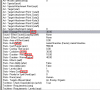
(Okay, I accidentally showed Aerial Shackles. Same concept.)
Let's do something simple. Let's change the name of the ability.
Scroll down to Text - Name. It should have (anam) after it. This is the important part.
You see what I did there? First, anam. It tells what we need to change. Then, you enter a string value (does not accept variables) as your next parameter.
If you are not sure what type of parameter a field takes, press Ctrl + D and look at that field's value in the Object Editor. Beware, some fields which take integers will cause the ObjectMerger to supply the ASCII value of the integer you meant to supply. To avoid this, you need to use "\xxx", where xxx is a three digit number. This part is very important when dealing with Channel based abilities.
And, lastly, if a field can take multiple parameters (such as Unit - Abilities), you add a comma between each argument.
That's a simple edit. Now to slightly more complicated stuff. Let's set how many levels are in the ability.
Stats - Levels has the (alev) code after it. Perfect. Let's set the max level to 1.
Yes, as you change more, it gets longer and more unreadable. Nothing I can change.
Let's edit the damage to 0. Now, this part is really important!
There are fields that multiply when you edit how many levels an ability has (damage, cooldown, etc.). When changing these with the ObjectMerger, you need to tell it which level this affects. Even on a 1 level ability. Annoying, I know.
Data - Damage's code is (Htb1). We need to modify level 1. So:
Htb1 1 0
This sets Level 1 Damage to 0.
Excellent! Go on to set cooldown and mana cost to 0. Duration, if you want an infinite stun.
Closer... We should've done this step earlier. You must set the model the ability uses to nothing. " " will do ("" does something weird. It gets replaced with //================).
It takes a string instead of the usual number. Exactly like the name did.
There! A good dummy stun! I neglected to set duration to 0, but that is easy enough to do on your own.
This command is ready to run. Save the map. Exit the map. Open the map. Delete this line of code.
Check in the object editor, and voila! A nice dummy Storm Bolt, even named My Stun!
This isn't enough. Let's create a custom buff to go with our spell!
I ordered ObjectMerger to copy BPSE (Stunned (Paused)), set the new buff's raw code to STNB, and changed the name to My Stun Buff. Let's add this buff to our custom stun.
The order in which you type the commands does not matter one bit.
You can do this with units, doodads, destructables, whatever. It's just handiest to use with abilities and buffs, for there is no need to make masses of unit types.
Grimex is well coupled with textmacros. A textmacro to make an item, an ability, and give the ability to the item can greatly speed things up. Here's a textmacro to make a ring of protection, an armor ability to go with it, and ties the ability to the ring.
For information on how to use textmacros, see the Jasshelper Manual (World Editor Bible).
Now, making new rings is cake!
This one was rather simple. It's perfectly possible to make the tooltips change depending on the input. Icons, too!
Imagine an RPG where you need ~12 of a certain potion, only slightly varying between types. Wouldn't it be a nightmare to manually make every single potion? Once you make a good textmacro you can do...
Lua with ObjectMerger
Now, onto more complex, possibly more readable, and more flexible usage of the ObjectMerger. Feel free to disregard this section if you do not need more advanced ObjectMerger tools.
Good use of this method compiles much faster than the above methods, but takes a bit of time to learn.
It is possible to make an ObjectMerger lua script right in the trigger editor. The first thing we need is the external block. You may ignore the syntax and just see it as "heddur" and "fuder". It would be wise to look for an lua tutorial.
Now, we choose what type of object we are going to deal with. This is simpler than the w3u and w3a madness the previous method requires. Lines of lua script should be prefixed with [lJASS]//! i [/lJASS].
And now we can finally get to the modification or creation of objects. One difference between this and one line ObjectMerger calls is that this can modify and create objects.
This is an example of modifying units.
And that's how it's done! Creating objects is only slightly more complex.
Combined with textmacros, this becomes rapid compiling gold.
But wait! There's even more!
It is possible to modify every WC3 object of a type at once! I think I'll let the script explain itself
The ObjectMerger is an external program that can be used to create or move object data, the stuff you change in the Object Editor. Moving object data from map to map is useful only in very specific circumstances. I will focus on the creation of new object data, instead.
Creating new object data with the ObjectMerger is done with a one line command. To run an existing ObjectMerger command, save the map. Exit the map. Open the map. Your new data will be there.
This tutorial will teach you the basic structure of an ObjectMerger command to create new object data.
Required
- NewGen WE
- Grimex (Comes with NewGen)
Yes, that's all. ObjectMerger is best used to create stacks of abilities, for things like Bonus. Creating many similar objects and editing a small part of each at once is made simple with the ObjectMerger. It is important to note that ObjectMerger is not called dynamically. You cannot create new abilities during gameplay.
You enter an ObjectMerger command into anything that accepts and parses Jass code (the map header or a trigger paged converted to Custom Script.) This most likely works in even the GUI Custom Script action.
JASS:
//! external ObjectMergerThere. First, the //! tells Jasshelper that there is a special command to execute.
A parameter, for those who don't know, is something you input into a program or function that the program or function uses or changes internally.
The 'external' parameter tells that we need to call an external (duh) program. The name of the program? The second parameter. ObjectMerger.
In conclusion, don't bother figuring out how that part works and just type it in.
Now, what are we going to create? We need to know very badly. The next parameter tells what we're going to create. Here's a handy table.
- w3u units
- w3t items
- w3b destructables
- w3d doodads
- w3a abilities
- w3h buffs
- w3q upgrades
Now, let's say we're creating a stun ability for a dummy caster.
So, begin our command and add the next parameter. w3a, ability.
JASS:
//! external ObjectMerger w3aDoing well! Now, we need the raw code of the ability to base our ability on. Storm Bolt, it stuns. That is the next parameter.
(Simple raw code tutorial.)
JASS:
//! external ObjectMerger w3a AHtbThe next parameter is the raw code we want our new object to have. Let's call it STUN.
It is important to note that objects created via the ObjectMerger overwrite any existing ones that have the same raw code. Be careful about raw code overwriting, grasshoppah.
JASS:
//! external ObjectMerger w3a AHtb STUNThat's the hard part. Now we can edit the ability itself!
Look at the inside of Storm Bolt, in the object editor (Display Raw Data turned off).
After every field, there is a small four letter code.
(Okay, I accidentally showed Aerial Shackles. Same concept.)
Let's do something simple. Let's change the name of the ability.
Scroll down to Text - Name. It should have (anam) after it. This is the important part.
JASS:
//! external ObjectMerger w3a AHtb STUN anam "My Stun"You see what I did there? First, anam. It tells what we need to change. Then, you enter a string value (does not accept variables) as your next parameter.
If you are not sure what type of parameter a field takes, press Ctrl + D and look at that field's value in the Object Editor. Beware, some fields which take integers will cause the ObjectMerger to supply the ASCII value of the integer you meant to supply. To avoid this, you need to use "\xxx", where xxx is a three digit number. This part is very important when dealing with Channel based abilities.
And, lastly, if a field can take multiple parameters (such as Unit - Abilities), you add a comma between each argument.
That's a simple edit. Now to slightly more complicated stuff. Let's set how many levels are in the ability.
Stats - Levels has the (alev) code after it. Perfect. Let's set the max level to 1.
JASS:
//! external ObjectMerger w3a AHtb STUN anam "My Stun" alev 1Yes, as you change more, it gets longer and more unreadable. Nothing I can change.
Let's edit the damage to 0. Now, this part is really important!
There are fields that multiply when you edit how many levels an ability has (damage, cooldown, etc.). When changing these with the ObjectMerger, you need to tell it which level this affects. Even on a 1 level ability. Annoying, I know.
Data - Damage's code is (Htb1). We need to modify level 1. So:
Htb1 1 0
This sets Level 1 Damage to 0.
JASS:
//! external ObjectMerger w3a AHtb STUN anam "My Stun" alev 1 Htb1 1 0Excellent! Go on to set cooldown and mana cost to 0. Duration, if you want an infinite stun.
JASS:
//! external ObjectMerger w3a AHtb STUN anam "My Stun" alev 1 Htb1 1 0 acdn 1 0 amcs 1 0Closer... We should've done this step earlier. You must set the model the ability uses to nothing. " " will do ("" does something weird. It gets replaced with //================).
It takes a string instead of the usual number. Exactly like the name did.
JASS:
//! external ObjectMerger w3a AHtb STUN anam "My Stun" alev 1 Htb1 1 0 acdn 1 0 amcs 1 0 amat " "There! A good dummy stun! I neglected to set duration to 0, but that is easy enough to do on your own.
This command is ready to run. Save the map. Exit the map. Open the map. Delete this line of code.
Check in the object editor, and voila! A nice dummy Storm Bolt, even named My Stun!
This isn't enough. Let's create a custom buff to go with our spell!
JASS:
//! external ObjectMerger w3h BPSE STNB fnam "My Stun Buff"I ordered ObjectMerger to copy BPSE (Stunned (Paused)), set the new buff's raw code to STNB, and changed the name to My Stun Buff. Let's add this buff to our custom stun.
The order in which you type the commands does not matter one bit.
JASS:
//! external ObjectMerger w3h BPSE STNB fnam "My Stun Buff"
//! external ObjectMerger w3a AHtb STUN anam "My Stun" alev 1 Htb1 1 0 acdn 1 0 amcs 1 0 amat " " abuf 1 STNB
You can do this with units, doodads, destructables, whatever. It's just handiest to use with abilities and buffs, for there is no need to make masses of unit types.
Grimex is well coupled with textmacros. A textmacro to make an item, an ability, and give the ability to the item can greatly speed things up. Here's a textmacro to make a ring of protection, an armor ability to go with it, and ties the ability to the ring.
For information on how to use textmacros, see the Jasshelper Manual (World Editor Bible).
JASS:
//! textmacro MakeArmorRing takes AMOUNT, NAME
  //! external ObjectMerger w3a AId1 AR$AMOUNT$ Idef 1 $AMOUNT$ anam "$NAME$" ansf "($AMOUNT$)"
  //! external ObjectMerger w3t rde1 AR$AMOUNT$ iabi AR$AMOUNT$ unam "$NAME$"
//! endtextmacro
Now, making new rings is cake!
JASS:
//! runtextmacro MakeArmorRing ("01", "Crude Armor Ring")
//! runtextmacro MakeArmorRing ("02", "Minor Armor Ring")
//! runtextmacro MakeArmorRing ("04", "Lesser Armor Ring")
//! runtextmacro MakeArmorRing ("06", "Moderate Armor Ring")
//! runtextmacro MakeArmorRing ("08", "Armor Ring")
//! runtextmacro MakeArmorRing ("12", "Greater Armor Ring")
//! runtextmacro MakeArmorRing ("16", "Superior Armor Ring")
//! runtextmacro MakeArmorRing ("22", "Superb Armor Ring")
//! runtextmacro MakeArmorRing ("30", "Perfect Armor Ring")
This one was rather simple. It's perfectly possible to make the tooltips change depending on the input. Icons, too!
Imagine an RPG where you need ~12 of a certain potion, only slightly varying between types. Wouldn't it be a nightmare to manually make every single potion? Once you make a good textmacro you can do...
JASS:
//! runtextmacro MakeHealingPotion ("100", "Simple Healing Potion")Lua with ObjectMerger
Now, onto more complex, possibly more readable, and more flexible usage of the ObjectMerger. Feel free to disregard this section if you do not need more advanced ObjectMerger tools.
Good use of this method compiles much faster than the above methods, but takes a bit of time to learn.
It is possible to make an ObjectMerger lua script right in the trigger editor. The first thing we need is the external block. You may ignore the syntax and just see it as "heddur" and "fuder". It would be wise to look for an lua tutorial.
JASS:
//! externalblock extension=lua ObjectMerger $FILENAME$

//Lua goes here.

//! endexternalblock
Now, we choose what type of object we are going to deal with. This is simpler than the w3u and w3a madness the previous method requires. Lines of lua script should be prefixed with [lJASS]//! i [/lJASS].
JASS:
//! externalblock extension=lua ObjectMerger $FILENAME$

//! i setobjecttype("units") //"items", "upgrades", etc.

//! endexternalblock
And now we can finally get to the modification or creation of objects. One difference between this and one line ObjectMerger calls is that this can modify and create objects.
This is an example of modifying units.
JASS:
//! externalblock extension=lua ObjectMerger $FILENAME$

//! i setobjecttype("units") //"items", "upgrades", etc.

//! i modifyobject("hpea")  //Let's proceed to modify the peasant. We can refer to the peasant with 'current'.
//! i makechange(current, "usca", 1.25)  //Set peasant scale to 1.25.
//More modifications here.

//! i modifyobject("hfoo")  //Now footman.
//! i makechange(current, "usid", 1000)  //Set day sight radius to 1000.
//More modifications.

//! endexternalblock
And that's how it's done! Creating objects is only slightly more complex.
JASS:
//! externalblock extension=lua ObjectMerger $FILENAME$

//! i setobjecttype("units") //"items", "upgrades", etc.

//! i createobject("hpea", "h000")  //Copy the peasant, and give the new unit type the rawcode h000.
//As before, we can refer to it with 'current'.
//! i makechange(current, "usca", 1.25)  //Set our new unit's scale to 1.25.
//More modifications here.

//And just to show you that multiple object types in one block is perfectly valid...
//! i setobjecttype("items")
//! i createobject("afac", "i000") //Flute of Accuracy cloned.

//! endexternalblock
Combined with textmacros, this becomes rapid compiling gold.
But wait! There's even more!
It is possible to modify every WC3 object of a type at once! I think I'll let the script explain itself
JASS:
//! externalblock extension=lua ObjectMerger $FILENAME$

//! i setobjecttype("units")

//! i makechange(custom, "usca", 1.25)  //Set the scale of all custom units to 1.25.
//! i makechange(original, "usca", 1.25)  //Set the scale of all original units to 1.25.
//! i makechange(modded, "usca", 1.25)  //Set the scale of all modified original units to 1.25.
//! i makechange(unmodded, "usca", 1.25)  //Set the scale of all unmodified original units to 1.25.


//! endexternalblock


