How to: Create Day and Night Models with Omnilight

NullCurrent

( ゚ε ゚)
Reaction score
111
Day and Night Models with Omnilight​

Introduction:
What is this tutorial?

This tutorial teaches you to use and create "DayandNight" Models and "Omnilight".​

What are "DayandNight" models?
"DayandNight" models are what make the lighting in Warcraft look like day and night.​

What are "Omnilights"?
Omnilight is the spread of light in Warcraft, an example is the "glowing" torch.​

Tools Required:

Creating Day and Night Models:
  1. Open the War3 Model Editor I will call it just "Model Editor" from now on.
  2. Go to "Windows".
  3. Click "MPQ Browser"
  4. Open one of the Day and Night models. In "Enviroment/DNC/..."
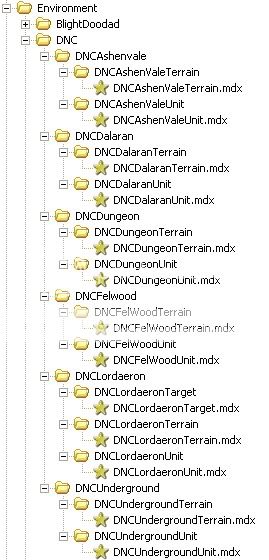
    DropDown.jpg
  5. When you have opened one of the models, go to "Windows" and click "Node Manager".
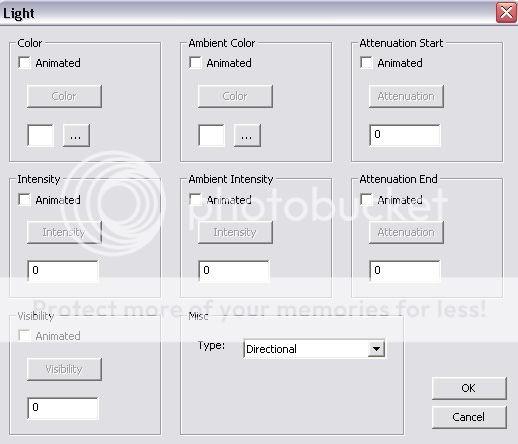
  6. You will see a screen like this:
    EmptyNode.jpg
    • Color: The color of the light.
    • Intensity: The amount or "brightness" of the light.
    • Ambient Color: The color that surrounds the doodads in-game.
    • Ambient Intencity: The amount or "brightness" of the ambient light.
    • Attenuation Start: The point where the light begins to loose intensity.
    • Attenuation End: The point where light ends.
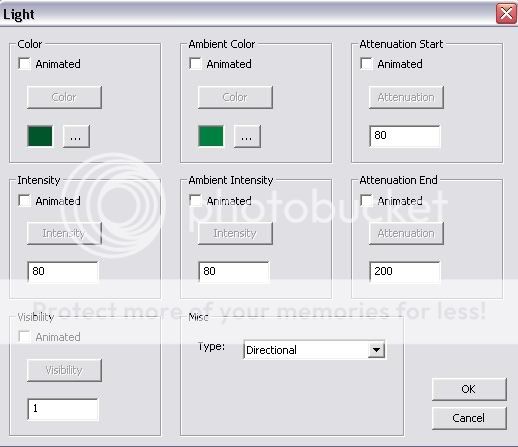
  7. Edit these fields to your liking. Here, I will make one that looks like night vision.
  8. This is what I set my light node as:
    GreenNode.jpg
  9. And this is what it looks like, in-game:
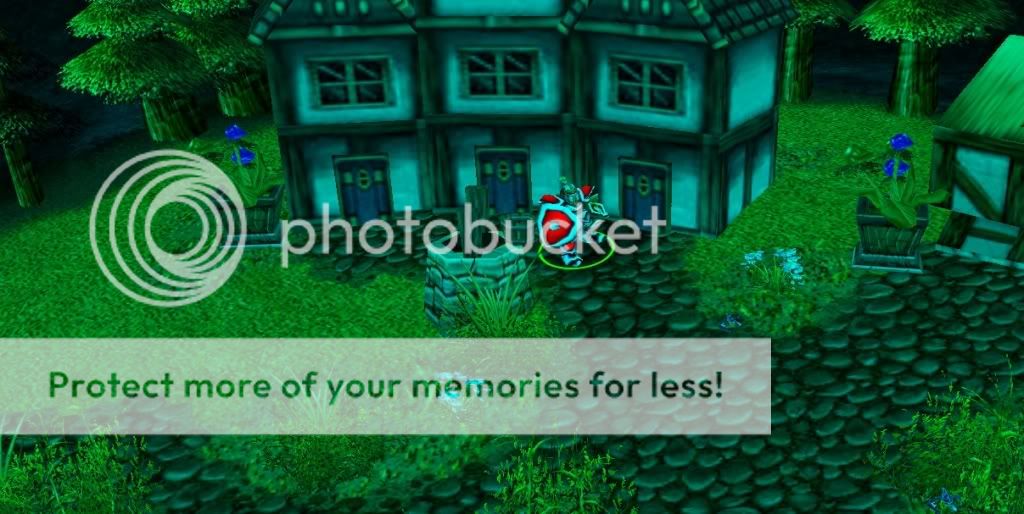
    DarkGreenLight.jpg
  10. Ta-Da! You made a "DayandNight" model! Now, how do you use it?
    NOTE: When you use Ambient Color and Intensity, doodads that are "unrevealed" show as that color It makes it look strange..

    Such as:
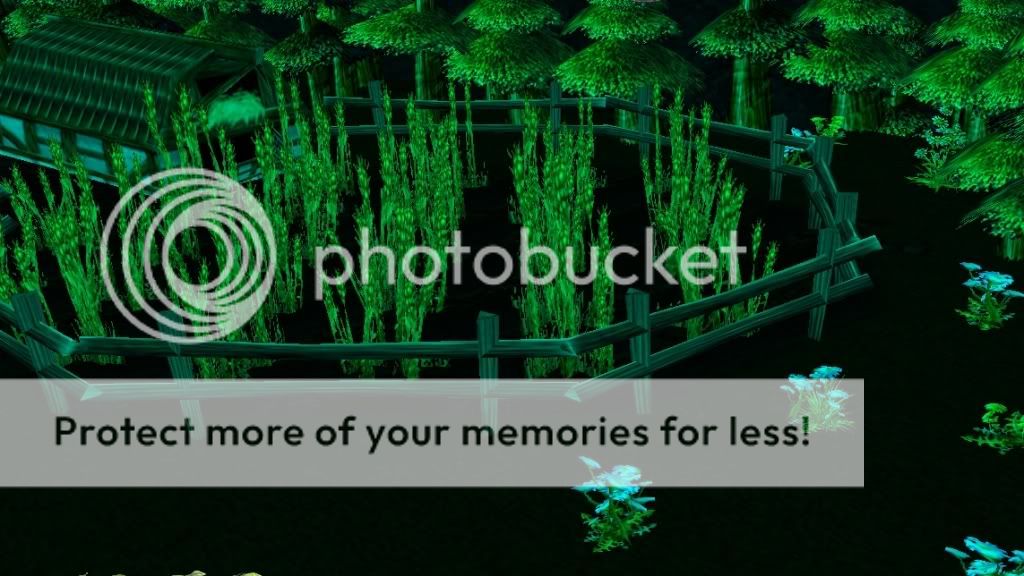
    UnfoundGreenLight.jpg

Using Day and Night Models:
  1. Open the World Editor
  2. Import the DayandNight model.
  3. Rename it If you want by double clicking and checking "use custom path"
  4. Save map and close the World Editor.
  5. Reopen the map.
  6. Go to the trigger editor.
  7. Create a new trigger Or add on from an older trigger.
  8. Add a new "Action".
  9. Select "Custom Script" in the drop-down menu.
  10. Type in:
    Code:
    call SetDayNightModels("...","...")
  11. Where the ...'s are, type the name of your dayandnight model. Keep the quotations.
  12. If you want to only make one person see the light...
    • Add in this code:
      Code:
      Custom script:   if GetLocalPlayer() == [COLOR="Blue"]PLAYER[/COLOR] then
      Custom script:   call SetDayNightModels("...","...")
      Custom script:   endif
    • For PLAYER use the jass code for the certain player, such as:
      Code:
      Custom script:   if GetLocalPlayer() == GetOwningPlayer(GetTriggerUnit()) then
    • This will get the owning player of the triggering unit.

Creating Omnilights:
  1. Open the model editor.
  2. Browse the MPQ Browser for the model you want to create an omnilight on.
    Or you can create a torch or something from my other tutorial How To: Model Weapon Attachments with Particle Emitters Just make a stick with a fire looking particle emitter at the top. Then add omnilight.
  3. Once you have your model that you want to add the omnilight to, go to the Node Manager.
  4. Right-click the window and click "Create Light".
  5. Right-click the Light node and select "Edit Node".
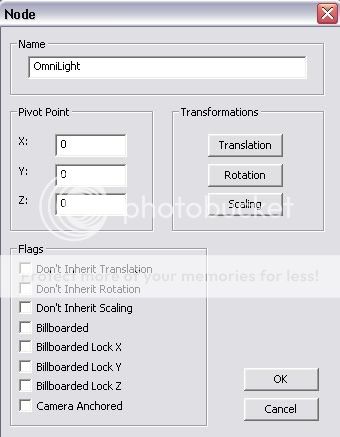
  6. A screen like this will pop up:
    EditNode.jpg
  7. The Pivot Points, X, Y, and Z, are where the omnilight comes from. So you want this to be where the lantern or whatever is making the light is.
  8. I do not recommend changing any of the checks.
  9. Next, double click the node.
  10. Change all of the variables to what you want. But, I will show you a basic "torch" like light:
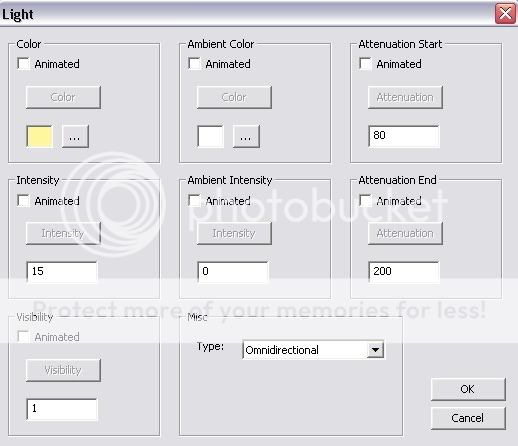
    OmnilightNode.jpg
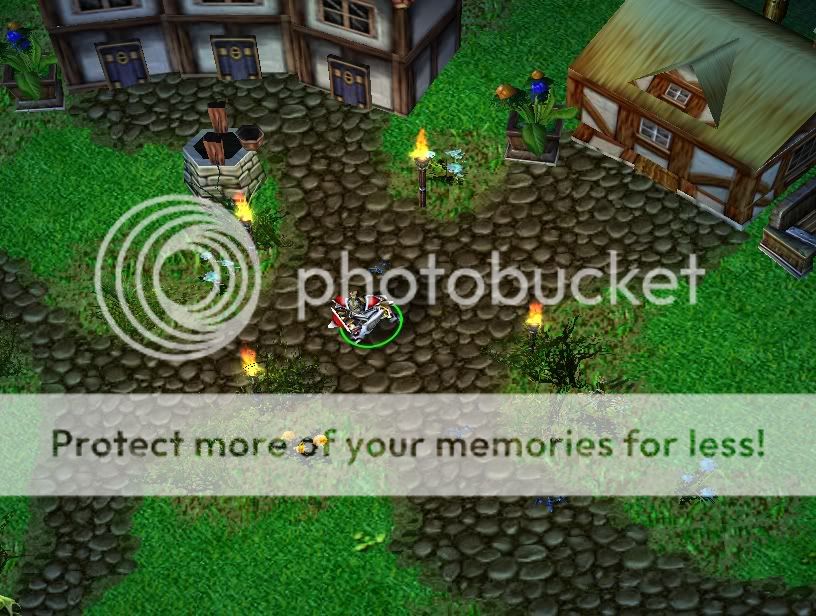
  11. This is what it looks like, in-game:
    Omnilighttorches.jpg
  12. Done!

Neat Idea:
If you want a really dark cave or something, do this:
  1. Add this code:
    Code:
    Custom script:   call SetDayNightModels("","")
  2. Put nothing in the quotations.
  3. Then add some omnilights to make it look like this:
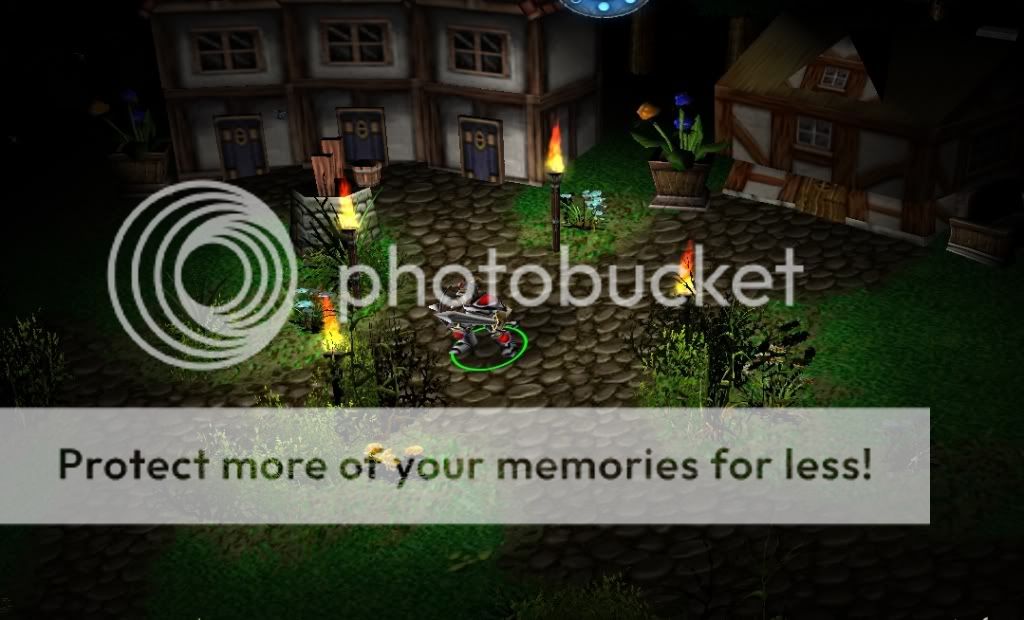
    DarkOmniLight.jpg
That's it!
If you need help, please don't hesitate to ask.
Check out my other tutorials!
How To: Model Weapon Attachments with Particle Emitters & Voting With Dialog Boxes
If this helped you and you enjoyed it, tell me.
Constructive Criticism Appreciated!
 
One problem, though, it seems in the image that when you make day/night models, they don't affect objects you place.
 
It isn't extremely noticeable, but the objects all have a green tint.
Besides, they're mostly green to begin with.
 
That isn't really what this is about. This deals with the light that covers Warcraft, and the light given off of objects (torches).
But, to do that, just make a region of where you want it, then edit the region and make the region have heavy dungeon blue fog.
 
is there a way fade filters wont be affected by this? they are black. tried acting as if it were a model and typed in the path but didnt work.
 
A nicely formatted and written tutorial.

There's never enough of tutorials about model editing, too.

Approved.
 
Ohh, cool. I never thought someone would get around to this tutorial.
I'm glad its approved, and I hope it helps. =D

xxxtrickyxxx said:
is there a way fade filters wont be affected by this? they are black. tried acting as if it were a model and typed in the path but didnt work.

Sorry, I didn't even know that fade filters were affected by this. Thus, I have no idea on how to stop it.
 
Creating Day and Night Models:

When you have opened one of the models, go to "Windows" and click "Node Manager".
You will see a screen like this:

Spoiler!

Color: The color of the light.
Intensity: The amount or "brightness" of the light.
Ambient Color: The color that surrounds the doodads in-game.
Ambient Intencity: The amount or "brightness" of the ambient light.
Attenuation Start: The point where the light begins to loose intensity.
Attenuation End: The point where light ends.
Edit these fields to your liking. Here, I will make one that looks like night vision.
This is what I set my light node as

ok these steps are VERY unclear they look good at first but when i tried changing the colors and light and all that i got this weird wall of bizzare looking code i couldn't decrypt and i couldn't change the color to green or anything else. could you please explain the process better?

edit: wow, i figured it out!

you have to uncheck the animated box and then you can select your normal color.

ok i got another problem! how do you name the models?

i tried not renaming them and when i went to set the models i just have black terran and units. i'm not sure if i need the .mdx at the end or not...

edit:
working finally!!!! you have to just set it like the path in the model editor. i recommend copying the path to the clipboard. then when you call make that entire path be the name. i guess this might also mean though if your model was war3imported\filename you would need to call for that path and it should be ok, idk, but just doing it the path like the way i found it in the mpq browser in the model editor worked!
 
Cool. You figured it out, I think I will edit to say it in the actual tutorial. Thank you for bringing that to my attention.

@black.sheep: Im sure there is a way with triggers, but I don't have my WE open and I am a little busy. I will try to get back to you on that.
 
Has anyone else noticed a problem in wc3 with deleting lights? They linger for some time after the light source, such as a special effect, is removed. Is there any way to make the light disappear immediately.

Also, how do you get animated intensity to work. Everytime I activate it for a light, not only does the light not show in wc3, but the model editor crashes when I try to open the file.

Normal sequences to my understanding are the standard animations. But what do global sequences do?
 
What if you want to make it different for day and night? Normally in w3 when night falls it goes darker and afaik what causes this is the DNC, no? Then how do you make it change for custom ones?
 
call SetDayNightModels("...","...")
Check the trigger above... Instead of leaving this part blank (where the ... are), put in what you want to use for your day in ... #1 and what you want to use for night in ...#2.

But, you will have to go into depth making your DayandNight models and edit some more things, that you see in the node manager.
 
I converted this .mdl to .mdx with Magos Model Editor and used it in my map alot for street laterns.
Code:
Version {
    FormatVersion 800,
}
Model "" {
    NumLights 1,
    BlendTime 150,
}
Sequences 1 {
    Anim "Stand" {
        Interval { 0, 3333 },
    }
}
Light "Omni01" {
    Omnidirectional,
    static AttenuationStart 1,
    static AttenuationEnd 2,
    static Intensity 500,
    static Color { 0.1, 0.1, 0.1 },
    static AmbIntensity 1100,
    static AmbColor { 0.1, 0.1, 0.1 },
}
PivotPoints 1 {
    { -2.59302, 0.194191, 17.3677 },
}
Then I create another doodad, giving it the exact same model as above but with Intensity 100 and AmbIntensity 200. (And also the same settings in the object editor)
Problem: As soon as some specific street laterns get into the camera view the light from the second doodad disappears (for ever!).
(Renaming the Light to "Omni02" in the .mdl file didn't help)
Now if I use a new model with the same intensity the light will never disappear and work just like it should, even if i change for example the Attenuation.
So the lights with the higher intensity shut out the 'smaller' lights for ever.
Even using units and recreating them every 0.05sec won't work.
How can I fix this?

I put this line in the Map Init trigger:
Code:
call SetDayNightModels("","")
All street latern lights work properly.

//E: This also happens in the world editor, and also for standard models like the glowing torch.

//E2: Found the solution! See here: http://www.thehelper.net/forums/showthread.php?p=1292391#post1292391
 
I dont know if anyone will see this but... Whats te code in:
Custom script: call SetDayNightModels("","")
for normal color (i want to make it realistic, night - its hard to see and day - normal)
 
General chit-chat
Help Users
  • No one is chatting at the moment.
  • Varine Varine:
    I had to allergen guides earlier this week and that is SO MUCH just looking through ingredients and trying to figure out if a company is correct
  • Varine Varine:
    Like did you know you can have gluten free products that still technically contain wheat?
  • Varine Varine:
    I did know that but forgot and spent several hours learning why until I remembered I knew that
  • Varine Varine:
    Xanthum gum can be made from wheat, but is processed in a way that no gluten is present, but it still presents a risk for severe wheat allergies that are NOT gluten
  • Varine Varine:
    Do you think the people that answer the phone for that company have any idea about that? Because they do not, nor can they tell me where they get that xanthum gum usually so I can't ask the people that make it, nor do they particularly care if I'm the one risking people's lives and not them.
  • Varine Varine:
    So that was my week building up to today, because that is when I got the menu and had to guess at the actual recipes for two of those days, because again I think he threw this into AI and ran with a lot of it
  • Varine Varine:
    I should have had all of this like a month ago but whatever, it's fine. He's trying a thing, idk it's his menu I don
  • Varine Varine:
    I don't care.
  • Varine Varine:
    Fuck I need more saturday nights off. Turns out I'm much cooler to drunk girls. If I hang out with enough people like that, eventually I'll meet one that likes me sober too
  • Varine Varine:
    idk if anyone has ever done IT. I am not IT but I just got off a 20 minute phone call with the general manager asking me how to make her new computer print. I do adore her, like I know her personally, but I asked three times if the printer was on. She apologized for bothering me, and Chef Ben walked in a few minutes later, turned the printer on apparently, and then called to ask if I was trying to print shit from my house again
  • Varine Varine:
    So I have a newfound appreciation
  • Varine Varine:
    And also I'm going to remove that one from my secondary career options
  • Varine Varine:
    As I get older I'm not thinking I can do this forever anymore, and I'm kind of dead end right now. I get a fine salary and fair raises, like I can easily live my lifestyle on this normally, but I don't know if I can do this in ten years, and I don't think I want to. I don't really have any desire to take over another restaurant, and I don't want to try and own one, and I doubt I'll luck out like I did with that taco place in Texas
  • Varine Varine:
    I have a math degree but that was a while ago and I'm not positive I actually deserved that. It was kind of just given to me I feel like cuz I was in school so long. Like for a bit as a teenager I got real into the mormon thing, and my dad grew up kind of similarly. Much like he fell out of it
  • Varine Varine:
    Anyway he started coming to church with me for a bit, and they gave home the I think Melchizedek? idk how to spell it, but it's the 'upper' priesthood, like he had a whole blessing thing after I got baptized, and it WAS a very neat experience. And the only reason I think they did they did that was cuz he was like late 30s, and that is kind of the age that they have the last chance at that
  • Varine Varine:
    And I mean its not, but like... I'm pretty well set in my lack of religious beliefs, I guess. And I'm a bit younger than my dad would have been then.
  • Varine Varine:
    And then I got real into, he got bored and was like you do you dude, and that's how I got a huge amount of freedom when I started doing drugs as a teenager
  • Varine Varine:
    In hindsight my parents were fantastic. but they were too fucking tired to raise kids like me. And their jobs were easier with better benefits.
  • Varine Varine:
    Anyway idk where I'm going here, but I asked ChatGPT some of the same things and holy shit was it way more strict and just gave me (importantly the wrong) phone number to a hotline
  • Varine Varine:
    TH, I gotta say, though, I'm amazed you keep this up. I feel like there are you and Ghan doing whatever you're doing, Tom posting news, and then me using the chatbox as a journal every once in a while.
  • Varine Varine:
    Thanks for letting me do that, also. I know I'm not using it correctly, but somewhere along the line I went from arguing with Cheshire to using this as a kind of void for my frustrations and hopes. I like to think of the whole thing as an enigma of sorts
  • Varine Varine:
    It's not, you guys could probably blackmail me if you went back far enough. I doubt anyone would, you've always been very kind, and I'm glad to have been a part of all this! I hope you enjoy me too, cuz I'm going to keep doing it.
  • Varine Varine:
    In my defense I was high for a lot of that though
  • V-SNES V-SNES:
    Thanks for sharing @Varine
  • The Helper The Helper:
    Brother how long we been here together? You guys are some of my best friends and I have never even met any of you. I dont know what I would if I did not have my Varine rant to look at when I get on. How could I possibly ever shut this site down? We have been here in this little chat box through a lot of shit for a long time. I love you guys!

      The Helper Discord

      Members online

      No members online now.

      Affiliates

      Hive Workshop NUON Dome World Editor Tutorials
      Top