Media Player Problems

Cognitor

New Member
Reaction score
2
I installed an updated version of media player from the microsoft website, the Windows Media Player 9 Series (...for windows ME, which is what I have). I did the whole setup, and restarted. Now, I can't run any videos through media player; all I get when videos are opened is the audio from it.
I figured a system restore would do the trick to get it off my computer and revert back to the my previous version (and the microsoft site instructed me to do this as well in order to get rid of it). When I went to system restore, however, I had no restore points at all for some reason AND it did not allow me to create any restore points. It just said to restart and try creating a restore point again. I did this and it kept giving the same message.
Bottom line: Media Player is screwed up, I can't get rid of the new version, and there are no restore points and I can't create any.
If there's any additional info that you need, just ask. Thanks for the help.
 
Yeh, but some sites only play videos from media player if you decide not to download the video so I sort of need media player. (Unless this has to do with my settings not the website in which case I can change it (Although I don't know how if it is an option))
 
ok, please download the G-Spot codec utility here:

http://www.headbands.com/gspot/

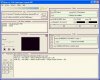
See the screen. Look fo the MS A/V rendering option at the bottom. Hit 1 first to find the codecs the file is using, then 2 to play the file in GSpot. See what happens.

Whether it succeeds or fails, please report back and I will guide you through the next step.

You probably have an issue with your installed codecs, which are causing a strange anomaly in the DirectShow renderer. That's the theory, but we'll see what the reality is.
 

Attachments

  • irfanview pic.jpg
    irfanview pic.jpg
    72.5 KB · Views: 278
I'm sort of unsure of what to do. I don't know if we are looking at the same thing here.

Im trying to upload a pic of what I have but it's 750KB and the site only allows me to upload 500. I probably don't know what I'm doing and as I remember it, there's a way to decrease the size by changing the properties or name of the file, can't remember, but that's where you come in :o
Tnx.
 
click the "..." next to Path and find your video, Ive never used this ply but for most it should start playing.
 
sorry I forgot to mention you should download the latest beta, not the latest "official" release.

Get the beta here: http://www.headbands.com/gspot/GSpot252b01.rar

Install this one ^^

Drag and drop your video file into the program, or do what sgrage said, same thing.

Then look for the MS A/V rendering option in the bottom-left corner. Hit 1 first to find the codecs the file is using, then 2 to play the file in GSpot. See what happens.
 
Before I do that, I was going through the settings or setup and everytime I tried to complete/finish it, I get the message "An internal application error has occured." Any feedback on this before I do the whole scan thingy?


Thnx
 
are you talking about scandisk? or something else?

can you take a screenshot of the error?

what settings or setup are you talking about?
 
Ok, I don't know what happend this time around, but I decided to reinstall it a fourth time and apparently this time it works. I don't know why. Sorry for the trouble. Thanks for the help tho. Very much appreciated.

-Cogs
 
General chit-chat
Help Users
  • No one is chatting at the moment.
  • V-SNES V-SNES:
    Happy Friday!
    +1
  • The Helper The Helper:
    we were down for a minute - think a log file or something got too big
    +1
  • Ghan Ghan:
    The alerts say it was down for a while unfortunately.
  • Ghan Ghan:
    Didn't know what was going on while I was at work.
  • Ghan Ghan:
    Disk filled up with logs. Fixed now.
    +1
  • The Helper The Helper:
    not a problem at all thanks for getting us back up
  • The Helper The Helper:
    I think the bots are finding a way to get through the anubis
  • The Helper The Helper:
    Happy Wednesday Everyone! Hope everyone has a Fantastic Day!
    +1
  • The Helper The Helper:
    Yeah, stats are showing big bot influx like 12k page views.
  • Wizard Wizard:
    :wave:
    +1
  • Ghan Ghan:
    TH changed his avatar again. 6 more weeks of summer.
    +3
  • Wizard Wizard:
    lol
    +1
  • The Helper The Helper:
    Guys just a heads up I am going to be shutting the site down soon. I am just waiting on the NUON people to decide whether they want to transfer forum data and keep the discord. My email is [email protected] for anyone that wants to keep in touch and I have a facebook too. I will make an official post later. Love you guys and will miss everyone!
    +1
  • V-SNES V-SNES:
    Sent a pm @The Helper
  • Stephen Stephen:
    Oh no - please don't lose the Nuon content
    +1
  • The Helper The Helper:
    Someone email AtariAge and see if they want me to transfer the forum data over to it
  • Ghan Ghan:
    Could probably keep NUON stuff around here if we wanted.
  • Ghan Ghan:
    Hmm what to do about the World Editor site though?
  • Stephen Stephen:
    I'd rather personally just own a backup of the Nuon data than see it go to AtariAge honestly. If it gets enshittified as per usual, or if some of the "regular" Jaguar folks get there, it's not gonna be fun
  • The Helper The Helper:
    There will be a github of the forum data so the NUON Forum Data I guess would be available there
  • The Helper The Helper:
    World Editor is technically Ryoko stuff not mine you guys can keep that I am not in that even
  • jonas jonas:
    :( end of an era :(
  • The Helper The Helper:
    Dont think of it as an end jonas - think of it as a beginning, because really my friend that is what it is.
  • A Andyoyo:
    Thank you for the hard work over the years. It did not go unnoticed.

The Helper Discord

Staff online

  • Ghan
    Administrator - Servers are fun

Members online

Affiliates

Hive Workshop NUON Dome World Editor Tutorials
Back
Top